Table of Contents
1. What is Software Testing?
Software Testing is the process of evaluating a software application to identify bugs, verify functionality, and ensure the product meets quality standards before release.
Software testing means checking a software or app to make sure everything works correctly, there are no bugs, and the final product is reliable and ready for users.
Proper software testing helps you complete tasks smoothly without wasting time. It ensures the software works exactly the way it is supposed to.
Few examples to understand clearly about software testing
Imagine you click the ‘Login’ button and nothing happens—or the page just refreshes. A tester finds this issue before real users get frustrated.
Or think about a payment that shows an error on the screen, but the money still gets deducted in the background. Testers catch these problems early so users don’t have to face them.
2. Why Software Testing Matters
Software testing is important because today almost everything happens online — from filling out forms to making payments. That means we rely on software or apps for even the simplest tasks.
Now imagine this:
You’re trying to submit an exam form, and the moment you click “Submit,” it throws an error. Or the website crashes because of heavy traffic.
You get stressed… frustrated… and sometimes you even miss important deadlines.
The website or software owner wants their product to work smoothly, so proper testing is important. Developers build the product with the best effort, but some issues still slip through — and that’s where testers play a key role. Testers check every functionality, find what’s not working, and report it. After developers fix the critical issues and everything looks stable, the product can safely go live.
This is exactly what software testing helps prevent.
Let’s take another example:
You’re receiving payments for subscriptions, but the dashboard or analytics isn’t updating correctly.
What happens then?
You end up seeing wrong numbers, wrong revenue calculations, and that directly impacts your decisions and costing.
To avoid all this, we need to test every single functionality properly.
When every part of the software is tested, it works smoothly, accurately, and exactly the way users expect.
Here’s what can happen when software is poorly tested:
- App keeps crashing
- Security issues and data leaks
- Payment failures
- Frustrating customer experience
- Loss of revenue
- Low ratings and negative reviews
And here’s what proper testing actually protects:
- Your users
- Your business
- Your brand reputation
- Development time & cost
- Overall product quality
3. Goals of Software Testing
The main purpose of software testing is to make sure software works smoothly, and user able to achieved it goal
- Identify defects
- Ensure the product meets requirements
- Validate performance and security
- Improve user experience (Make things easy for users or clients)
- Reduce risks (No data loss)
- Prevent future failures
Ultimate goal of software testing is to deliver bug-free, stable, and reliable software.
4. Software Testing Life Cycle (STLC)
STLC is a step-by-step process that testers follow to make sure a software product is tested properly before release. It brings structure, clarity, and quality to the entire testing process.
Even though different companies may follow 6, 7, or 8 steps, the core flow remains the same. Here’s the simplest and most widely accepted 6-phase STLC.
1. Requirement Analysis
Testers study the requirements to understand what needs to be tested. This helps identify gaps, missing information, and testing priorities.
2. Test Planning
A test manager or lead creates the full test plan. It includes strategy, tools, timelines, effort estimation, and risk analysis.
3. Test Case Development
Testers write detailed test cases, test data, and expected results. These test cases guide the entire testing execution.
4. Test Environment Setup
The technical setup is prepared — devices, browsers, servers, test accounts, and tools. This ensures everything is ready for running the tests.
5. Test Execution
Testers run the test cases, compare actual results with expected results, and log bugs whenever something doesn’t work as intended.
6. Test Cycle Closure
After testing is completed, the team evaluates the test results, prepares reports, shares insights, and discusses improvements for future cycles.
5. Types of Software Testing
Here, Learn all types of software testing
A. Functional Testing (What the system should do)
Functional testing checks whether the application’s features work correctly according to requirements.
Common Functional Testing types:
- Smoke Testing – Ensures that the basic and critical flows work. If the smoke test passes, it gives a green signal to continue with further testing.
- Sanity Testing – Quick checks after small changes or fixes on stable build.
- Regression Testing – Ensures new updates haven’t broken old working features.
- Integration Testing – Checks if different modules work together.
- System Testing – Tests the complete end-to-end system.
- User Acceptance Testing (UAT) – Validates if the product is ready for real users.
- API Testing – Ensures APIs respond correctly and handle data properly.
B. Non-Functional Testing (How the system behaves)
Non-functional testing checks performance, security, speed, usability, and reliability of the software.
Common Non-Functional Testing types:
- Performance Testing – Checks speed, scalability, and response time.
- Load & Stress Testing – Examines behavior under high traffic or extreme conditions.
- Security Testing – Identifies vulnerabilities and protects user data.
- Usability Testing – Ensures smooth, user-friendly experience.
- Compatibility Testing – Checks how software works on devices, browsers, OS.
- Accessibility Testing – Ensures software is usable for people with disabilities.
Complete guide to all types of software testing
6. Manual Testing
Manual testers execute test cases without using automation tools. It means we test the software exactly the way a real user is going to use it. But while users mostly work in a positive way, testers think differently — we consider many types of users, what inputs they may give, what possible scenarios can happen, what actions they might take, and what if they don’t do something expected.
So a tester thinks from the perspective of thousands of users and checks whether the software works in all those situations or if it breaks.
We also perform negative testing, checking how the system behaves when a user does something unexpected or doesn’t follow the normal flow.
So, testing the software manually in all kinds of real and unusual scenarios is known as Manual Testing.
It’s all about using human logic, creativity, and real-life thinking to find issues that machines may miss.
Manual testing helps catch usability problems, visual mistakes, broken buttons, confusing flows, or anything that doesn’t “feel right” to a user.
Even today, when automation is growing fast, manual testing is still important because:
- Humans understand user behavior better
- Early bugs are easier to find manually
- Many test cases need human judgment
- New features are usually tested manually first
Simply remember like this,
Manual Testing means checking the software manually, without using any automation tools.
A tester behaves like a real user—clicking buttons, entering data, moving through screens—and observes whether the application works as expected.
Manual testing ensures the software works correctly, feels smooth, and delivers a good user experience before moving to automation or release.
Manual Testing Focus on:
- Bug exploration
- User experience
- Visual testing
- Negative testing along with positive testing
- Usability issues
7. Automation Testing 🤖
Automation Testing means using software tools or scripts to test an application automatically.
Instead of a human clicking and checking everything manually, automated scripts perform the actions faster, repeat tests easily, and run anytime—even at night.
It helps save time, reduce effort, and make the testing process more accurate, especially for tasks that need to be repeated again and again.
So where we use automation testing,
- Repeated test cases
- Large and complex applications
- Performance and load testing
- Faster releases in Agile and DevOps teams (CI/CD pipelines)
- Regression testing
However, automation does not replace manual testing. It works best when both are used together.
Automation testing uses tools to test software quickly, repeatedly, and efficiently – helping teams release better products faster.
Automation uses scripts and tools to run tests faster.
What is automation script?
An automation script is a piece of code that we write using a programming language such as Java, Python, etc. Once we write this code (called as script), we don’t need to test that feature manually again. Next time, we simply run that script, and it automatically tests the feature or software for us.
Popular frameworks & tools for software testing automation
- Selenium
- Cypress
- Playwright
- Appium
- Robot Framework
- JMeter (for performance)
8. Test Artifacts
Test Artifacts are the documents and files created during the testing process. They help teams understand what was tested, how it was tested, and what issues were found.
These artifacts make the testing process clear, organized, and easy for anyone to review. Testers document every stage of testing, and the main artifacts include:
- Test Plan – overall testing approach
- Test Cases – step-by-step test instructions
- Test Scenarios – high-level situations to test
- Test Strategy – long-term testing guidelines
- Traceability Matrix (RTM) – maps requirements to test cases
- Bug Reports – details of defects found
- Test Summary Report – final testing results and insights
Test Artifacts are the important documents that show the full story of the testing process from planning to execution to final results.
9. Software Testing Techniques
Types of Testing Techniques
Black-box Testing
Testing the software from the user’s point of view, without seeing the code.
White-box Testing
Testing with knowledge of the internal code, logic, and structure.
Grey-box Testing
A mix of both, limited understanding of the code while testing from a user angle.
Popular Black-box Techniques
- Equivalence Partitioning
- Boundary Value Analysis
- Decision Table Testing
- State Transition Testing
- Error Guessing
- Use Case Testing
White-Box Techniques
These require code-level knowledge and focus on internal logic.
- Statement Coverage
- Branch Coverage
- Condition Coverage
- Decision Coverage
- Path Coverage
- Loop Testing
- Control Flow Testing
Grey-Box Testing Techniques
Grey-box uses partial knowledge of the system (e.g., architecture, database, APIs).
There aren’t “standardised” named techniques like black-box or white-box, but testers commonly use these approaches:
- Matrix Testing
- Regression Testing with internal knowledge
- Pattern based testing
- Database Testing
- Session based testing
- Fault injection
10. Levels of Testing
Test levels explain when and how testing happens during the software development process. Each level focuses on a different part of the product to make sure everything works smoothly before release.
These levels represent how testing progresses step-by-step as the software grows from small components to the full product.
Unit ➝ Integration ➝ System ➝ UAT
Each level increases in:
- Scope
- Complexity
- Environment usage
- User involvement
They are serial in concept, but in modern Agile they can run in parallel. We have 4 levels of testing, they are mentioned below-
A. Unit Testing
Developers test small pieces of code (like functions or modules) to ensure they work correctly.
Who: Developers
Goal: Make sure individual units work correctly.
B. Integration Testing
After multiple units/modules are combined and tested together, testers check whether different parts of the system work well together.
Who: Dev + QA
Goal: Check how parts interact, share data, and work as a group.
System Testing
The whole application is tested as one complete system to verify end-to-end functionality.
Who: Testers
Goal: Verify the entire system meets requirements.
Acceptance Testing (UAT)
Real users or clients test the software to confirm it meets their needs before final launch.
Who: Real users or clients test the product.
Goal: Confirm it works for real-world business use.
11. Popular Software Testing Tools
Different tools help testers work faster, find issues easily, and test applications more accurately.
Here are some commonly used tools in the industry:
Selenium
A widely used automation testing tool for testing web applications in browsers.
Jira
A tool for bug tracking, task management, and project tracking used by testers and developers.
Postman
A popular tool for API testing — checking requests, responses, and API performance.
TestRail
Used to manage test cases, track execution, and organize all testing activities in one place.
BrowserStack
Helps test websites and apps on real devices and browsers without needing physical devices.
Appium
An automation tool for mobile app testing on both Android and iOS.
JMeter
A powerful tool for performance and load testing, checking how the system behaves under stress.
Playwright
A fast, modern automation testing tool for web apps, similar to Selenium but more advanced.
Burp Suite
A security testing tool used to find vulnerabilities, especially in web applications.
Katalon
An easy-to-use automation tool for web, API, mobile, and desktop testing, good for beginners.
12. AI in Software Testing (2026 Trends)
AI is transforming how testing works. It helps testers work faster, smarter, and spend less time on boring, repetitive tasks.
AI can automatically create test cases, find patterns in bugs, select which tests matter the most, and even heal broken test scripts on its own. It also helps in predicting risky areas of the product, generating test data, and running natural-language test steps (like typing “test login flow”).
But the most important part is AI is not replacing manual or automation testers.
It is simply making their work easier and more efficient. Human thinking, creativity, judgment, and real-world understanding are still required — AI just supports the process.
What AI Brings to Testing
- AI-generated test cases
- Self-healing test scripts (automatically fix broken locators)
- Predictive bug analytics
- Smart regression test selection
- Auto-defect detection
- AI bots for creating test data
- Natural-language testing (write tests in plain English)
Trending AI Testing Tools
- Mabl
- Testim
- ReTest
- Applitools
- ChatGPT-based test automation
13. Software Development Life Cycle (SDLC)
SDLC is the step-by-step process of building software – from an idea to a final working product. It helps teams plan, design, develop, test, and deliver software in an organized and predictable way.
Software Industry follows SDLC for delivering rich quality software to their clients to reach the maximum satisfaction percentage.
In easy way you can say SDLC is the roadmap for creating software.
Here’s how it usually works:
1. Requirement Analysis
Understanding what the client or users want. What problem should the software solve?
2. Planning
Deciding timelines, budget, tools, and team responsibilities.
3. Design
Creating the structure of the software – UI, architecture, data flow, and system design.
4. Development
The coding phase where developers build the actual application.
5. Testing
Testers check if the software works correctly, is stable, and meets all requirements.
6. Deployment
Releasing the software for users. This could be a web release, app store launch, or internal rollout.
7. Maintenance
Fixing issues, updating features, and improving performance after release.
14. Software Development Models & Testing
Different development models involve testing at different stages. Knowing this helps testers work better with teams.
Where Testing Fits In
1. Waterfall (Software Development Model)
Work happens in fixed stages: Requirements → Design → Development → Testing (at the end). Testing starts only after the whole product is built.
2. Agile (Software Development Model)
Development and testing happen together in small, quick cycles. Testers work continuously with developers.
3. Scrum (Agile Framework)
Scrum is a way to implement Agile. Work happens in short cycles called sprints, and testing is done within every sprint.
4. Kanban (Workflow Method)
Kanban focuses on continuous flow. There are no sprints — tasks move across a board (To Do → In Progress → Testing → Done). Testing happens continuously without deadlines.
5. DevOps (Culture + Practices)
DevOps is not a model — it’s about collaboration between Development + Operations + QA. Testing is automated and connected with CI/CD pipelines for fast releases.
6. Shift-Left Testing (Testing Approach)
Testing starts as early as possible, even during planning and design.
Goal: catch bugs early and reduce cost.
7. Continuous Testing (Automation Practice)
Tests run automatically at every stage- build, integration, deployment. Helps detect issues instantly.
15. Bug Severity vs Priority
Sseverity is how serious a bug is (crash vs minor UI), Priority is how fast it should be fixed (business need).
Bug Severity vs Priority
When we find a bug in software, two things matter most: Severity and Priority.
Severity → How serious the bug is.
- Does it break the system?
- Does it stop users from working?
- Example: App crashes every time you click “Login.” That’s high severity.
Severity (Impact on the system)
- Critical → The bug breaks the system or stops main features.
- Major → The bug affects important functions but the system still works.
- Minor → The bug is small, like a cosmetic issue or typo.
Priority → How urgent it is to fix
- Should we fix it right now or later?
- Example: A spelling mistake on the About page. Severity is low, but if the product is launching tomorrow, fixing it becomes high priority.
Priority (Order of fixing)
- High → Must be fixed immediately.
- Medium → Should be fixed soon, but not urgent.
- Low → Can be fixed later, not blocking work.
Quick Example that gives you clarity about severity and priority
- Login button not working → Severity: Critical, Priority: High
- Wrong color on homepage banner → Severity: Minor, Priority: Low
- Spelling mistake on About page before launch → Severity: Minor, Priority: High
Severity = impact on the system, Priority = order of fixing
Both are important because a bug can be very severe but not urgent, or very urgent but not severe.
16. Bug Life Cycle (Defect Life Cycle)
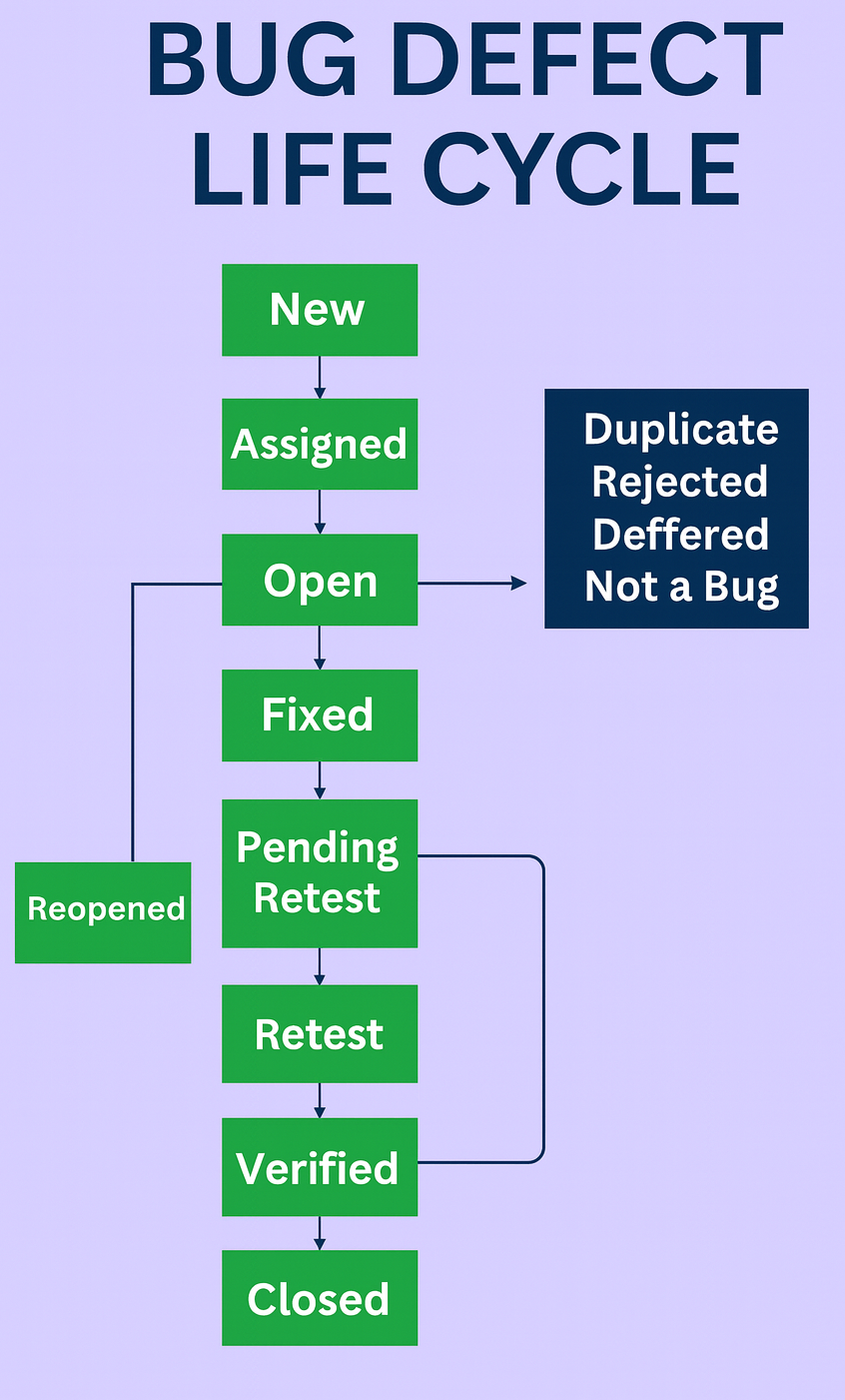
A bug life cycle or defect life cycle shows the journey of a bug from the moment it is found until it is fixed and closed.
Steps in Bug Life Cycle
- New → Tester finds a bug and reports it.
- Assigned → The bug is given to a developer to fix.
- Open → Developer starts working on the bug.
- Fixed → Developer solves the bug and marks it as fixed.
- Retest → Tester checks if the fix is working.
- Verified → If the bug is gone, tester marks it verified.
- Closed → Bug is fully solved and closed.
- Reopen → If the bug still exists after testing, it is reopened and the cycle continues.
- Deferred → The bug is valid but will be fixed in a future release, not right now.
- Duplicate → This bug has already been reported earlier, so no need to log it again.
- Not a Bug → The reported issue is actually expected behavior or not a real defect.
- Rejected → The bug report is not accepted, usually due to lack of clarity or relevance.
17. Test Coverage
Test coverage how much of the application is tested (requirements covered, code paths hit, or features verified). Helps in spotting gaps.
Example:
If your app has 100 lines of code and your tests run through 80 lines, your code coverage is 80%.
Below are the most commonly used test coverage types. These help measure how much of the application is tested from different angles.
Common types of test coverage:
1. Code Coverage
Shows how much of the source code is executed during testing (lines, branches, conditions). Useful for unit testing and identifying untested code.
2. Function Coverage
Checks whether all functions, modules, or features of the application are tested. Ensures every functionality is verified at least once.
3. Requirement Coverage
Measures how many client/business requirements are covered by test cases. Ensures nothing the customer requested is missed.
4. Test Case Coverage
Test Case Coverage shows how many test cases you have executed compared to how many you planned to test. It helps you understand how much testing is finished and how much is still left.
5. Risk Coverage
Ensures all high-risk or business-critical areas have been tested. Helps reduce severe defects in production.
6. Data Coverage
Checks whether tests cover all important input variations (valid, invalid, boundary, edge cases). Useful for forms, validations, and complex data processing.
7. Compatibility Coverage
Measures testing across browsers, devices, OS versions, screen sizes, etc. Important for web/mobile applications.
8. User-Flow (End-to-End) Coverage
Ensures complete real-life user journeys are tested (e.g., login → browse → checkout → payment). Makes sure important workflows work from start to finish.
18. Latent Defect(Also called Dormant Defect)
A latent defect is a bug that is already present in the system, but it doesn’t show up during normal testing. The bug stays hidden because the situation that makes it show up has never happened.
19. Defect Leakage
A defect is called leaked when testers miss it during testing, and it is later discovered by users, customers, or the UAT team after the testing phase.
Defect leakage means a bug that escaped testing and was found later, usually in:
- UAT (User Acceptance Testing)
- Production / live environment
- By customers or end users
20. Entry & Exit Criteria
Clear conditions that must be met before testing starts (entry) and before testing ends (exit). They prevent unclear “done” definitions.
Entry and Exit Criteria are checklists that help a testing team decide:
- When to start testing
- When to stop testing
These criteria ensure testing is done in a structured, planned, and high-quality way.
Entry Criteria (When testing can start)
Entry Criteria are the minimum conditions that must be ready before testers begin their work.
In simple words: “Do we have everything we need to start testing?”
Exit Criteria (When testing can stop)
Exit Criteria tell the team when they can finish testing for that cycle or release.
In simple words: “Have we tested enough to call this release ready?”
Testing can never be 100%. No matter how much you test, something will always be left, and bugs can still appear. That’s why we need clear Exit Criteria — a point where we decide testing can stop.
22. Career in Software Testing
Career in software testing is one of the most stable and growing paths in the IT industry. Every company, small or big needs testers to ensure their software works correctly, stays secure, and delivers a smooth user experience.
Why it’s a great career:
- You don’t need strong coding skills to start
- Huge demand in India and worldwide
- Clear growth path (Manual → Automation → Senior QA → Test Lead → QA Manager)
- Opportunities in web, mobile, gaming, fintech, AI products, healthcare and more
- Testing is becoming more important as apps become complex
What skills you need:
- Basic understanding of software development
- Logical thinking and good observation
- Ability to find issues and explain them clearly
- Basics of test cases, bugs, functional testing
- Automation skills (Selenium, Playwright, API testing) for growth
Career paths you can choose:
- Manual Tester
- Automation Tester
- QA Analyst / QA Engineer
- Performance Tester (JMeter)
- Security Tester (Burp Suite)
- Mobile App Tester (Appium, BrowserStack)
- QA Lead / Test Manager
Salary expectations:
Beginners in India start around ₹3–5 LPA, and experienced testers with automation earn ₹10–25 LPA+, depending on skills and company.
Why testing will always stay:
As long as software exists, someone must check it. Companies can automate tests, but they still need humans for logic, creativity, usability, and decision-making.
23. Common Myths About Testing
Testing has many misconceptions, especially among beginners. Here are some popular myths:
- “Only coding people can test”
Not true. Testing is about logic, observation, and understanding user behavior. - “Manual testing will die”
Manual testing is still needed for usability, exploratory testing, and complex scenarios that automation can’t handle. - “Testers only find bugs”
Testers ensure the whole product experience is smooth — performance, usability, edge cases, accessibility, everything. - “Automation replaces manual testing”
Automation supports testing, but it can’t fully replace human intuition or real user scenarios. - “Testing is easy”
Testing requires critical thinking, domain knowledge, and problem-solving. It’s a skill, not a quick task.
24. Real-World Testing Examples
- Payment gateway failures or issues
Like double charging, payment stuck, or timeout errors. - Login flow bugs
OTP not sent, incorrect error messages, session issues, verification email not received etc. - App crashing due to load
Happens when a sudden spike in users overloads the system. - Responsiveness issues, Broken UI on mobile devices
Buttons overlapping, text cut off, layouts breaking on different screen sizes. - Wrong calculations in ecommerce checkout
Discount mismatch, tax miscalculation, wrong totals — very common bugs. - Images broken
- Security issue
By changing id able to access others data
25. Future of Software Testing
The testing landscape is changing fast. Here are the big trends shaping the future:
- AI-driven testing – AI helping in test generation, predictions, and faster feedback.
- Autonomous testing – Tools running and fixing tests without human effort.
- Scriptless automation – Create tests without writing code.
- Hyper-automation – Combining multiple automation technologies for end-to-end testing.
- QA + DevOps integration – Testing becoming part of CI/CD pipelines.
- Non-functional testing demand increase – More focus on performance, security, accessibility.
- Security-first development – Shift-left security testing.
- More browser/device fragmentation – Continuous need to test across various platforms.
26. Conclusion
Software Testing is the backbone of product quality.
Software testing is no longer just about finding bugs — it’s about delivering a reliable, smooth, and user-friendly experience. From testing types to tools, real-world examples, AI trends, and career paths, this guide gives you a complete foundation to understand how modern QA works.
