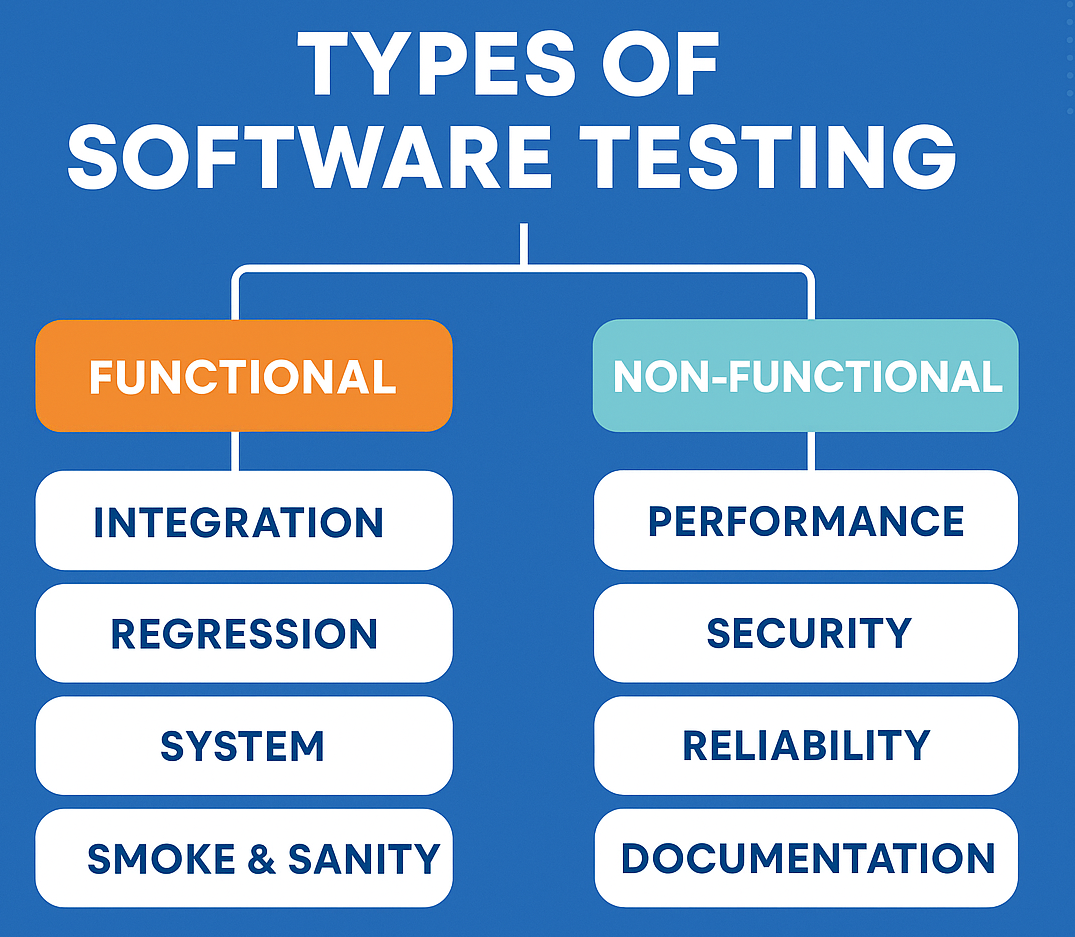
When you first start learning about types of software testing, it’s normal to feel overwhelmed. But don’t worry, this guide explains everything in simple language.
Testing is one of the most important parts of software development. It helps us make sure that a website, app, or software works correctly, feels smooth to use, and doesn’t surprise users with unexpected errors.
But here’s the thing most beginners don’t know:
There isn’t just one type of testing, different situations need different kinds of tests.
Sounds confusing? Don’t worry.
You’re in the right place.
In this blog, we’ll break down all the major types of testing in the simplest way possible.
also learn here: Master guide to software testing, useful for everyone
Whether you’re a beginner or someone preparing for interviews, this guide will help you understand the foundation of software testing the right way.
Let’s get started!
Types of Software Testing
Table of Contents
1. Based on How Testing Is Done
1.1 Manual Testing
Manual testing is done by humans in a manual way, without using any automation tools. You test the software exactly the same way a real user would use it by following the user’s steps and actions.
A manual tester checks the application by applying both positive testing and negative testing.
When it’s used:
- New features
- Usability testing
- Short-term projects
1.2 Automation Testing
In automation testing, we write scripts and use tools (Selenium, Playwright, Cypress, etc.). Once we run the script, we can focus on other tasks. After the script completes, it generates a report where you can see the test pass and fail status.
When it’s used:
- Repeated work
- Regression testing
- Large projects
2. Based on What We Test
2.A Functional Testing
In functional testing, we check the functionality part of an application. It checks what the application does – its features, buttons, forms, and processes.
“Does the login work?”
“Does the search show correct results?”
Functional Testing Includes:
2.1 Smoke Testing
Smoke testing is done on the initial build. It takes very less time and quickly checks the most important functionality to ensure the application is stable. If the smoke test passes, then only we can move to further testing.
- Quick check to ensure the basic features are working.
- Like checking if a new phone turns on.
When?
After a new build is delivered.
2.2 Sanity Testing
Sanity testing is done on a stable build. A round of regression testing has already been completed, and we receive a build with a minor change.
Quick check of one or two functions after a small fix.
Example: Developer fixes the login bug → you test only login.
2.3 Regression Testing
Regression testing ensures that a new feature or any fix does not affect the previously working functionality.
Testing old features again after new changes.
2.4 Integration Testing
Integration testing is done between connected modules. It checks how two or more modules work together and whether they communicate properly without issues.
Example: Login module + Dashboard module.
2.5 System Testing
System testing is the phase where the entire system is checked. The whole application is tested end-to-end to ensure all modules, features, and integrations work together correctly.
2.6 User Acceptance Testing (UAT)
UAT is done by business users or clients. They test the application to confirm that it meets their business needs, works as expected in real-use scenarios, and is ready for release.
2.7 API Testing
API testing is a type of testing where we check how two software systems talk to each other. Instead of testing the UI, we test the backend requests and responses.
We make sure the API sends the right data, handles errors properly, works fast, and behaves correctly when we give valid or invalid inputs
Api testing is done through using tools like Postman.
2.8 Database Testing
Database testing checks whether data is stored correctly or not. When we insert, update, delete, or fetch data, we verify that everything works as expected. It ensures the database is saving accurate data and returning the right results.
Example: After deleting a user, does the database update properly?
2.9 Verification & Validation
Verification – Are we building the product right?
Verification means checking the product during development to make sure we are building it correctly.
It focuses on documents, designs, requirements, and processes — not the actual running software.
Example:
Reviewing requirements, checking design documents, inspecting test cases.
Validation – Are we building the right product?
Validation means checking the actual software to make sure it works correctly and meets user needs.
It focuses on testing the real application.
Example:
Running test cases, usability testing, functional testing, UAT, etc.
2.B Non-Functional Testing
In non-functional testing we test how well the application works. We are talking in terms of speed, security, performance, reliability.
So lets begin what includes in non-functional testing
2.1 Performance Testing
Performance testing checks how fast, stable, and smooth an application works when many users use it at the same time. It helps us see if the app can handle load, respond quickly, and perform well under stress.
It focus on application’s speed, stability, and responsiveness.
Performance testing is mainly divided into 4 important types:
a. Load Testing – Normal Load
Load testing checks how the system performs when the expected number of users use it at the same time. Load testing Measures response time, Checks stability under normal peak usage
Example: Testing how the app behaves with 1,000 users (its expected load)
b. Stress Testing – Extreme Load
Stress testing checks how the system behaves when the load is more than its limit. Stress testing helps in identify breaking point. It shows how the system recovers after failure
Example: Pushing the system with 5,000 users when it is designed for 1,000
c. Endurance – Long Duration Load
Endurance testing checks how the system performs when it runs under load for a long period of time. Endurance tetsing helps in finding memory leaks. It checks long-term performance
Example: Running the system at normal load for 24–48 hours
d. Spike Testing – Sudden Traffic Jump
Spike testing checks how the system handles a sudden increase in users in a very short time. It tests reaction to sudden traffic
Example: Load jumps from 200 users to 2,000 in seconds, just like during Amazon Black Friday deals.
2.2 Security Testing
Security testing checks whether the application is safe from threats and attacks. It makes sure that data is protected, only the right people can access the system, and no one can misuse or break the application.
Example:
Data protection
Login security
Vulnerability testing
2.3 Usability Testing
Usability Testing is the process of checking how easy and enjoyable a product, website, or application is for real users to use.
It focuses on understanding if people can navigate it, complete tasks without confusion, and have a smooth experience. The goal is to find problems, make improvements, and ensure the product feels intuitive and user-friendly.
It checks how easy it is for the user.
Example:
Is the button visible?
Is the flow smooth?
Does the user get confused?
2.4 Compatibility Testing
Compatibility Testing is checking if a software or app works well across different devices(Laptop,desktop,tab,mobile,iphone etc), browsers(Chrome,edge,firefox etc), operating systems, or networks, making sure all users have a smooth experience.
Does the app work across:
different browsers
different devices
different OS versions
2.5 Accessibility Testing
Accessibility Testing is checking if a website, app, or software can be easily used by everyone, including people with disabilities, making sure no one faces barriers while using it.
2.6 Reliability Testing
Reliability Testing is checking if a software or system works consistently and correctly over time, without crashes or errors, so users can trust it to perform as expected.
3. Based on System Knowledge
3.1 Black Box Testing
Black Box Testing is a way of testing software by checking if it works correctly from the user’s perspective, without worrying about how the code or system works inside.
Tester doesn’t know the internal code. The complete focus is on inputs and outputs.
Example:
You enter email & password → check if login succeeds.
3.2 White Box Testing
White Box Testing is a way of testing software by looking at the code and internal workings to make sure everything functions correctly and efficiently.
Tester knows the internal code, logic, loops, and conditions.
Who : Both testers and developers who have knowledge of the internal code can perform white box testing.
3.3 Grey Box Testing
Grey Box Testing is a type of testing where testers know some parts of the internal code but not everything. It combines both black box and white box testing to check the software from both inside and outside.
It is the combination of Black + White Box.
4. Testing Levels (Done Step-by-Step)
These are the stages at which testing takes place.
4.1 Unit Testing
In unit testing we checks individual parts or pieces of code(functions, methods) to make sure each one works correctly on its own. Usually unit testing is done by developers.
4.2 Integration Testing
Testing how different parts of the software work together, making sure they connect and communicate properly. In integration testing we ensure how two or more modules work together.
Example:
Login + Dashboard connected properly?
4.3 System Testing
Testing the complete software as a whole to see if it works as expected in the real environment. Basically we test the application from start to end.
4.4 Acceptance Testing (UAT)
Letting real users try the software to see if it meets their needs and works the way they expect.
5. Testing Types Every Tester Should Know
5.1 Exploratory Testing
Exploratory testing works exactly as the name says, we explore the app and find bugs while exploring. In this testing, the tester explores and tests in parallel.
This testing doesn’t require any predefined test cases to check the software or app.
Exploratory testing helps identify hidden and unexpected bugs that we may miss while writing test cases.
5.2 Ad-hoc Testing – No plan, no documentation.
Ad-hoc Testing is completely unplanned and informal testing. There are no test cases, no documentation, and no structure. The tester just tries random actions to find defects. Tester tries random things to break the application.
5.3 Monkey Testing
Monkey Testing involves giving random inputs to the application, similar to how a “monkey” would randomly press buttons.
It is mostly used in mobile apps to see how the system behaves under unpredictable actions.
So, in this testing we give random input just like a monkey hitting buttons.
5.4 Risk-Based Testing
Risk-Based Testing focuses on testing the most important and risky areas first. Modules that can cause major failures, security issues, or money loss get the highest priority.
5.5 Retesting
Retesting is done when we report a bug and the developer fixes it. After the fix, we verify again to confirm that the reported bug is resolved as expected this is called retesting.
Retesting means testing the same failed test case again after the developer has fixed the bug. The goal is to confirm that the fix actually works.
5.6 Static Testing
Static Testing checks documents, requirements, design, or code without running the software. This includes reviews, walkthroughs, and inspections. It helps catch early mistakes before development moves ahead.
5.7 Dynamic Testing
Dynamic Testing is a type of testing where you actually run the software to check how it behaves. Testers execute the code, use the features, and look for bugs while the program is running. The goal is to make sure the software works correctly in real-time.
5.8 End-to-End Testing – Testing the whole user journey
End-to-End Testing checks the entire user workflow from start to finish. It ensures all systems, pages, and integrations work together as a complete experience.
Example: Login → search product → add to cart → payment → logout.
6. Special Testing Types
6.1 Alpha Testing – Done internally before releasing to real users.
Alpha Testing is the first round of testing done inside the company by testers or developers. It helps catch major bugs before the product is shown to real users.
6.2 Beta Testing – Done by a limited set of real users before final release.
Beta Testing is done by real users outside the company. They use the product in real-life situations and share feedback before the final launch.
6.3 Localization Testing
Checks if the app works correctly for a specific language, region, or culture, including translations, date formats, currency, and local rules.
6.4 Internationalization Testing
Ensures the app is built in a way that it can easily support different languages and regions without needing big changes.
6.5 Globalization Testing
Check if the product works correctly across different countries, combining both Internationalization Testing and Localization Testing
6.6 Recovery Testing – Checks how the system recovers after crash or failure
Recovery Testing checks whether the software can recover after a crash, power failure, or system issue. The goal is to ensure the system comes back to normal safely.
6.6 Installation Testing
Installation Testing verifies that the software installs, updates, and uninstalls properly without errors. It makes sure the setup process is smooth for the user.
Summary Table:
| Type of Testing | Purpose |
|---|---|
| Manual Testing | Human checks the app manually |
| Automation Testing | Scripts run tests automatically |
| Functional Testing | Test features (e.g., login, signup) |
| Unit Testing | Test individual code pieces |
| Integration Testing | Test connections between modules |
| UAT | User/client checks if software meets needs |
| Smoke Testing | Basic check before deep testing |
| Sanity Testing | Quick test after changes |
| Security Testing | Test protection from threats |
| Performance Testing | Check speed under normal use |
| Stress Testing | Test limits of the system |
| Regression Testing | Make sure old features still work |
Final Thoughts
To make software run smoothly, testing is a must. Most importantly, we should know what type of testing to do at each stage.
This post will help you understand which testing type is needed and when to use it.
Stay connected to learn testing in depth. We will keep adding every important and trending testing topic here.
Understanding these testing types is the first step to becoming a great software tester!
check here The master guide to software testing